7 August 2014

Install-CsDatabase : Command execution failed: Cannot find any suitable disks for database files.

Issue

The issue was seen when installing the latest CU. When installing the SQL part of a cumulative update you get the error:-

Install-CsDatabase : Command execution failed: Cannot find any suitable disks for database files. You must manually specify database paths.

Solution

The "suitable disks" error is triggered by the installer checks. The requirement is that a minimum of 16 GB of free space is available prior to installing\updating SQL. Simply cleaning up the drive where CSDATA lives to free up space gets it sorted.


25 July 2014

Office Web Apps Server Error

Issue

After following the basic install procedure I attempt to look at the Office Web Apps Farm configuration with the PS command Get-OfficeWebAppsFarm.
The following error is thrown..


Although many blogs explain that this issue is related to installing on a different drive than C, or that its specific to Windows Server 2008 or 2012


Solution

I found that (IMHO) the issues was unrelated to installation path or server version. Instead it appears to be an issue with the ASP.NET installation\registration with IIS.

This can be reinstalled\registered with the following command

C:\Windows\Microsoft.NET\Framework64\v4.0.30319\aspnet_regiis.exe -ir

NOTE
-ir - Installs ASP.NET and registers with IIS

Re-running Get-OfficeWebAppsFarm now works as expected


15 July 2014

Cant set port on IP/PSTN Gateway

There are some really good resources available on how to setup SIP trunking between Lync and Microsoft Certified gateways (such as Sonus and Audio codes).
One of my favorite resources is from Iain Smith at NorthernLync found here

Problem

Unable to set the port to 5061 when adding a PSTN gateway in Lync Topology builder.
 

Notice how finish is grayed out and we have an error next to the port.

Cause

The reason we have this is because by default the mediation servers are set to use TLS and thus listening on port 5067 and TCP isn't enabled. You can check this by expanding the Lync Server 2013 -> Standard Edition\Enterprise Edition. Right click on the Front End where the Mediaiation service is co-located and select Edit Propoerties

Scroll down to the Mediation Server details to see the Mediation Server configuration


Solution

Simply enable TCP by checking the check box and set the port range


Returning to the PSTN Gateway folder in Topology builder and selecting New IP/PSTN Gateway you will notice that you are now able to add the gateway as TCP using port 5060


Lync Management Shell not connecting

Problem

I came across an interesting issue yesterday..opening the Lync Management Shell I was presented with a blank shell window (nothing unusual there, just wait a few seconds, right?). However it just stayed right there, no connecting.

The environment is really a 4 site deployment with a total of 4 2013 front ends all running on Windows 2012 R2.


What was really interesting was that there was no errors, nothing...

I fired up power shell and tried importing the Lync module just in case my Lync Server Management Shell shortcut had somehow been corrupted and that worked fine.

So off to have a look at the shortcut I noticed that the decided to fire up the target manually in an attempt to isolate the culprit. 

Looking a little closer at the target I discovered that the closing quote was missing. Now how did that happen? 

Interestingly this issue happened on 2 of the 4 front ends within the same deployment. I have done many of these and not seen this before so am not sure what the underlying cause is. Perhaps a bug :-)


Solution

Simply edit the target and add the missing close quote as seen below.


Ripleys- Believe it, or not
I went back to the Front End where the Lync Management Shell was working..to my disbelief its target is missing the closing quote BUT it works anyway. Adding the closing quote to the working target made no difference. Unbelievable.
Go figure..

Of course you can simply fire up Power Shell and then import-module Lync

27 June 2014

Removing stale Lync references from AD

Problem

The old Lync 2010 Server\Pool was discovered when running ExchUCUtil. The image below depicts the 2 Pools I was expecting to see 1:2 and 1:1 BUT I wasn't expecting 1:4.


So when Lync is initially deployed a bunch of references are made in AD, of course if you remove Lync from the environment and don't do so gracefully then a bunch of unwanted references are ..still in AD.
 So far I haven't seen any other issues due to AD objects still referencing the old Lync 2010 Pool other than whats seen in the screen shot above, but (not being OCD of course) it needs to go as its messing with my Nirvana.

Solution

A deep dive into AD to remove the reference to the Lync 2010 Server\Pool showing up here as 1:4. 
ADSIEdit to the rescue in this case. We will need to find the specific references which will refer to servers and pools in Global Settings, Pools, Trusted MCUs, Trusted Services and Trusted WebComponentsServers.

So lets go and find these references then..
Open LDP by typing ldp in the run box and click OK


In the Connection window type the name of your DC in the Server Box and click OK


Select Connection - Bind
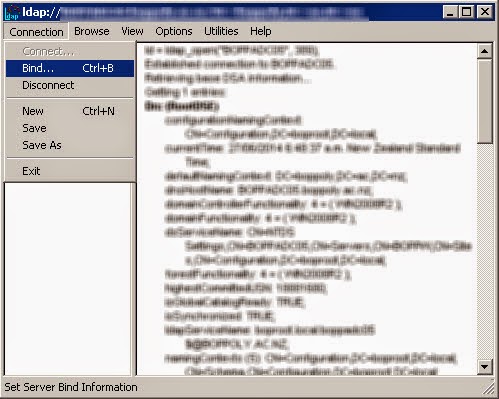


You need to Bind as a valid user,either use the currently logged on user, or specify an account with credentials
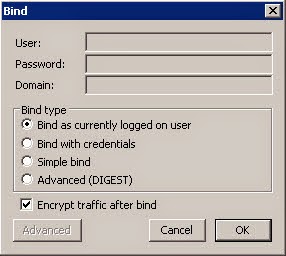

Next we need to view the tree


The BaseDN will depend on where the information is stored as follows:-
  • DC=domain,DC=com (information in System Container)
  • CN=Configuration,DC=Domain,DC=COM (information in Configuration


We need to drill down to the RTC Service container. Just a note that when you first see this view there is no indication that the container objects can be expanded, go ahead and double click on them anyway :-)


We can now search for the old server references. Right click on the RTC Service container and select search


Enter the following string in the Filter box (replacing the OldServerFQDN with the actual FQDN of the old server)

(msRTCSIP-TrustedServerFQDN=OldServerFQDN)
NOTEReturn to this step and do another search using the following 2 string formats to find Trusted Server and Trusted Web components:-
msRTCSIP-TrustedMCUFQDN=OldServerFQDN)
msRTCSIP-TrustedWebComponentsServerFQDN=OldServerFQDN)


Be sure to select Subtree so it searches all the trees below this entry. Then click run.
The search should return results in the righthand pane.

TIP
You can easily spot the results as they start with ***Searching...

In the image below you will notice that my environment found 2 entries


Be sure to make note of these results because they will be required to find them in ADSIEdit.

Next we will open ADSIEdit and connect to the configuration. The path to each CN is noted in the search we did just before so it really simple to find them.


In my example above I found both the containers and the 1:4 that was discovered when setting up UM (bonus..)

WARNING
Before deleting each of these review them by looking at the properties and confirming that they are OK to delete. A tell tale is the references to the individual services and the machines they run on seen in the differentTrustedServicePort and ServiceType attributes


To delete simply navigate to the full DN, right click and select delete


At this point you could return to the search in ldp and perform additional searches for 
Trusted Server and Trusted Web components.

Running ExchUCUtil now shows just what I expected..


1:4 Gone!
Peace restored

25 June 2014

Lync Share permissions

Problem

From time to time you may find that the deployment wizard fails at setting the permissions required to the Lync Share folder.

Product Version - Lync 2013

What permissions are required?


Solution

Usually running the Topology builder as Administrator does the trick
Alternatively you could manually set the permissions from the Advanced Sharing button


16 April 2014

Solving Invalid_AD_Phone_Numbers.txt

OK so if you are OCD (and nothing wrong with that) then you may be compelled to make the event warning on your front end reporting on Invalid numbers every morning just after 1:30 am.

The Event ID 21034 explains as follows:


Its arguably one of the most comprehensive and helpful Cause and Resolution events you may ever see!

The Process
When Lync collects the user data from Active Directory a number check is done and only numbers that conform to the E.164 numbering format (I have noticed that an E.164 number with a x1234 on the end is also permitted by default) are imported. Hence the errors..

So looking into the text file (located at Lync File share...1-WebServices-1\ABFiles\00000000-0000-0000-0000-000000000000\00000000-0000-0000-0000-000000000000\ called Invalid_AD_Phone_Numbers.txt)
What do we see?

Edited for simplicity I have shown below just a sample of the  culprits.

Unmatched number: User: 'sip:peter.pan@lyncsorted.co.nz'  AD Attribute: 'telephoneNumber'  Number: '095504321'
Unmatched number: User: 'fb56a490-0e27-4cac-b6cc-fb17ae0d4dba'  AD Attribute: 'telephoneNumber'  Number: '1234'
NOTE
Its VERY common to see entries with the strange SID looking user name, these are usually disabled accounts and can be hard to find the true user attribute. I usually do an advanced search and use the number attribute provided to find these. By the way, they do no harm just sitting there, its the valid accounts I concern myself with.

The number assigned to Peter Pan above is valid (but not an acceptable default format). To format this number to a recognised number for populate the Lync Address Book service a normalization rule set can be created. 
All numbers that do not comply to the E.164 format by default will parse through the AD normalization rule set to be transformed to E.164 (or any format you allow in the regex)

Do make sure that Lync ABS is configured to use this normalization rule set with the Lync Server Management Shell command:-


Get-CsAddressBookConfiguration


The name and location of the AD Normalization rule set is essential. The rule set must be called Company_Phone_Number_Normalization_Rules.txt and must be located in the central Lync File Share …\LyncShare\1-WebServices-1\ABFiles\


The contents of this txt file are documented in the table below:

## Sample AD Normalization rule set for populating AddressBook Service
##Created by PaulB
##
##Normalise to E.164
## 
##Local format from Active Directory into E.164
##Auckland (New Zealand) National Prefix (9) & Country Code added as +649 (and 6 or more digits)

([2-9]\d{6}\d+)
+649$1

##National format from Active Directory into E.164
##New Zealand Country Code added as +64 and dropped 0 (and 6 or more digits)

0([2-9]\d{6}\d+)
+64$1

##No DID, extension number only
## Assuming 4 digit extension and passing through to ABS transparently

([0-9]\d{3})
$1


Once the rules are added you can test by using ABServer.exe
ABServer.exe can be found at C:\Program Files\Microsoft Lync Server 2013\Server\Core (assuming default install directory)

Run ABServer.exe in the Command prompt window in the following format
 in the following format (where 095501234 represents the number to test)

ABServer.exe -testPhoneNorm "095501234"

In the below image I have run a valid number test not requiring additional normalisation, followed by a National format number. Notice how the first number (+6495501234 x5234) normalises to the expected line URI format used in Lync. It also mentions that the rule was matched by built in ABServer.exe rules

The Second test was in the national format (095501234), this was normalised by our Company_Phone_Number_Normalization_Rules.txt file to the Line URI +6495501234 as required.


Now to get the AddressBook syncrosised to Lync

From Lync Server Management Shell run:-

Update-CsAddressBook -verbose
  
Before adding these rules the non complying numbers don't show up in the users contact card, once the rules are in play and the address book has regenerated then the contact card show the numbers loaded from AD in the new accepted format.

Before                          After

25 March 2014

Lync 2013 Front End Service won't start


After a fresh install of Lync 2013 Standard Edition onto a Windows 2012 server, and its been running for about 2 weeks I may add...I came across the following issue

Issue

After a reboot of the Lync Standard Edition Server I found that the Lync Server Front End Server (RTCSRV) wouldn't start. It just sat there on "Starting"


Further Symptoms

Event ID 32174


Interestingly the Event ID reports that resetting the Quorum is a potential solution, not true in my case.

Event ID 32178


NOTE
There were many other Events triggered by the inability of numerous processes being able to connect etc etc

Cause

A common cause of this issue is if non self-signed certificates are imported into Trusted Root Certification Authorities instead of Intermediate Certification Authorities. Although this was not an issue in Windows Server 2008, Windows 2012 requires a high level of trust dependant on certification authentication.The result is that HTTP communication between Lync servers is broken.

Solution

Check the Trusted Root Certification Authority Store for any NON self-signed certificates. Self signed certificates have the same value for the Issued To and Issued By field. The screen shot below shows the highlighted certificate as not being self-signed (whilst residing in the Trusted Root Certification Authority Store)


Another quick way to check, especially when there are many entries, is to run the following PowerShell command:

Get-Childitem cert:\LocalMachine\root -Recurse | Where-Object {$_.Issuer -ne $_.Subject} | Format-List * | Out-File "c:\computer_filtered.txt"

The output file will contain the details of the culprit.

Now simply move the NON Self-Signed Certificate to the Intermediate Certification Authorities.
and the Self-Signed Certificates to the Trusted Root Certification Authorities

Microsoft KB article http://support.microsoft.com/kb/2795828 - 
Lync Server 2013 Front-End service cannot start in Windows Server 2012

5 February 2014

Lync Deployment Wizard fails - Input string was not in the correct format

The Problem
When Running the Lync Server Deployment Wizard - Install oe Update Lync Server System - Step 2: Setup or Remove Lync Server Components I get an error immediately after Disabling unused roles

The Error
Input string was not in the correct format

at System.Text.StringBuilder.AppendFormat(IFormatProvider provider, String format, Object[] args)
at System.String.Format(IFormatProvider provider, String format, Object[] args)
at Microsoft.Rtc.Internal.Tools.Bootstrapper.BootstrapperTask.OutStatusLine(String format, Object[] args)
at Microsoft.Rtc.Internal.Tools.Bootstrapper.BootstrapperTask.DeactivateRemovedRoles()
at Microsoft.Rtc.Management.Internal.Utilities.LogWriter.InvokeAndLog(Action action)


The Culprit
This turned out to be the Lync Admin account, I couldn't find any evidance pointing me to the cause other than a feeling of discomfort with the format of the Lync Admin User account name.
The Lync Admin account was similar to this:
{LyncAdmin}

Couldn't find any documentation saying the curly brackets may be an issue, but tried with an account that had a simpler format and the required permissions and tada...

The Solution
Initially I had the account renamed to something like LyncAdmin but it still misbehaved, recreating the account without curly brackets did the trick

29 January 2014

LPE wont sign in to Lync externally

The Problem

Lync Phone Edition (in my case Polycom CX500 and CX600) wont sign in to Lync from externally. Internally working fine.

The phone goes through the steps of finding the time server, then finding the Lync Server - OK. Then gets stuck on Signing in... Connecting to Lync Server
This also happened to the CX600 EVEN when pairing to my desktop over USB for sign in...


The Evidence

Checking the Lync Edge Server logs I found...nothing! Same as the Front End, also nothing!
Since everything else seemed to be working I started to wonder how the LPE's are different from the desktop client.
Going through the motions of validating the DNS using the RUCT.exe tool I found that when I tried to test the port availability on selected records on the SRV record for -sip._tls I got an error stating that the host was not found.

What I found was very interesting. The SRV record for  _sip._tls.sipdoamin.com resloved to sip.sipdomain.com BUT the Public Certificate Common Name was LyncEdge.sipdomain.com with the name sip.sipdomain.com as a Subject Alternate Name.

The Solution

I changed the the SRV record so that the target was the published public name LyncEdge.sipdomain.com. Effectively this meant that the SRV target was also the Common Name on the Public Certificate.

NOTE
The Common Name on the Public Lync Certificate should always be a resolvable target for the SRV records


21 January 2014

Sign-in canceled due to internal error - CX500 and CX600

Issue
The Lync phones (CX500 and CX600) no longer sign in to Lync 2013. Error message states "Please verify that the domain entered is correct"

After factory resetting the phone I still got the same error briefly followed by "Sign-in canceled due to internal error.Please try again"


I tested to see if the credentials were working with:

Test-CsPhoneBootstrap -PhoneOrExt "2705" -PIN "12121"

I checked the DNS setup
Lync Phones usually require as a minimum Option 42 and Option 120 (then enable DHCP Options on the Front End with .

set-CsRegistrarConfiguration -EnableDHCPServer $true

I tested the DHCP options with the DHCPUtil.exe -emulateclient
I also ran wireshark to see the client getting the DHCP options, connecting to Lync, negotiating certificates and then just stop as if the credentials were incorrect

Cause
Unknown...
Even though the traces showed that the phone was getting all the required DHCP options and the phone was chatting to the Lync Front End, I still had no success signing in.

Fix
I am not hugely excited about the Phone Logs so before I resorted to digging into them I simply ran through the Lync Deployment Wizard (Step 2)...

That did the trick "sigh"

Other potential causes
http://support.microsoft.com/kb/2464556

11 December 2013

Can't call UM - Event ID 44022

Issue

Unable to call UM

Evidence

Every time a call is made to the UM server the following error is logged on the Lync server front end:-
Log Name:      Lync Server
Source:        LS Exchange Unified Messaging Routing
Date:          10/12/2013 09:27:05 PM
Event ID:      44022
Task Category: (1040)
Level:         Error
Keywords:      Classic
User:          N/A
Computer:      lyncFE.lynclab.local
Description:
An attempt to route to an Exchange UM server failed.
The attempt failed with response code 504: exchum.lynclab.local.
Request Target: [DefaultUM@exchum.company.local], Call Id: [9f9a3df33d2544a9a22ff2c17feedcb5].
Failure occurrences: 4, since 10/12/2013 08:36:55 PM.
Cause: An attempt to route to an Exchange UM server failed because the UM server was unable to process the request or did not respond within the allotted time.
Resolution:
Check this server is correctly configured to point to the appropriate Exchange UM server. Also check whether the Exchange UM server is up and whether it in turn is also properly configured."

Solution

Make sure the dialplan is configured to use TLS (and not TCP). 

5 November 2013

Adding another Front End Server to the Enterprise Pool

Just recently I added another 2013 Front End Server to an Enterprise Pool and was subsequently presented with some interesting issues.

After adding the new Front End to the Topology and running the setup I moved on to migrating some test users and saw the following error:


Distributed Component Object Model (DCOM) operation SetMoveResourceData failed??

I checked the replication and all Lync servers were replicating.
Checking the Lync Topology servicers I found that my new Front End server wasnt in show room condition, see below:


The green check on the 3rd line shows replication OK but status not OK
So now I am wondering which services are not running, off to Front End number 3 to check the Lync services. As supected there are services that arent running.


Turns out both the Call Park Service and the Response Group Service wont start. Perhaps there is a hint as to why in the Event Log..


..and I found this clue. Seems that FE3 is unable to connect to the backend SQL. Also the little Inner exception reference (saw that in the DCOM reference).
Login failed for user was the real gem.

Checking with the SQL admin I got confirmation that FE3 was trying to connect to the Backend SQL database and failing the login about once every second (SQL guy not happy).

OK, so how come FE3 doesn't have the permissions on the Backend SQL server??
Seems that my temporary SQL Admin rights were not in place when adding FE3 to the Topology, this is when the SQL permissions are set. Interestingly there were no errors when I published the Topology.

How to fix these permissions? Either get unhappy SQL admin to re-publish the Topology with his SQL Admin account or get temporary SQL Admin permissions and DIY.

...yes, and voila


4 November 2013

OAuth certificate missing

Issue
Whilst deploying Lync Enterprise Edition with 3 Front End Servers I cam across an interesting issue. FE 1 was fine but when I fired up FE 2 and got to the certificate wizard the OAuth Certificate was missing.
One thing you will notice if there is no OAuth certificate is that the Lync Front End Service wont start. OK so where is the cert???

Found a good blog explaining the purpose of OAuth here (thanks Doug)
So fist thing was to see if the Front End Servers were replicating, and indeed they were BUT no OAuth. 

Checking the Cert Manager through MMC shows that the cert isn't in the personal store. Adding it there manually didn't help me much either...

Seems that it needs to be put there by the replication process.

I decided to move along (against my best judgement and the clock) and add the default cert to FE 2 and then come back to OAuth. Re-ran setup Step1 and Step 2, rebooted the server and after that still now OAuth.

Retracing my steps I noticed that the internal DNS records had not been added yet.

Resolution
You must add the Front End Pool FQDN with all the individual Front End Server IP addresses. Ensure that when you run nslookup that all the Front End IP's are found. If an IP is missing from DNS you wont get the OAuth Certificate....

Below is an error I got in the event log.

The replication of certificates from the central management store to ...2013, Replica Replicator Agent will continuously attempt to retry the replication.While this condition persists, the certificates on the local machine will not be updated

Object reference not set to an instance of an object.
at Microsoft.Rtc.Management.Common.Certificates.CertUtils.GetKeyFileName

1 November 2013

Edge Server wont Replicate

So "Lync Rescue" continues to keep me busy...

Issue
Got asked to look at why a Lync Edge Server wont replicate.

Cause
Seems that that the External IP addresses of the Edge server are resolving to Edge Server internal FQDN

Resolution
Correct DNS, the only DNS entry for the Edge Server should be the internal facing IP address resolving to the Edge Servers FQDN.

16 October 2013

Publishing Topology Completed with Errors - Microsoft.Rtc.Applications.TestBot

Issue
Publishing Topology Completed with Errors - Microsoft.Rtc.Applications.TestBot

What is Testbot?
Testbot is the little fella that runs the Audio Test Service

You can see TestBot SIP Address woth the Lync Server Management Shell command:
Get-CSAudioTestServiceApplication

OwnerUrn: urn:application:testbot
SipAddress: sip:RtcApplication-0e0e407a-6283-4c93-99fa-c0e252b8af09@lynclab.local

OK so that has also revealed the problem in my case, the SIP domain was renamed from .local to .com and it seems that TestBot now has an invalid SIP address.

Probably would have noticed other issues had I tried using the Audio TEst Service as that SIP address would be unreachable.

Solution
We will need to correct the TestBot SIP address in ADSIEdit.
Using the SIP address identity (from  Get-CSAudioTestServiceApplication) we can search for the object.

Identity: CN={0e0e407a-6283-4c93-99fa-c0e252b8af09},CN=Application Contacts,CN=RTC Service,CN=Services,CN=Configuration,DC=contoso,DC=local


  1. Open the ADSI Editor.
  2. Right click ADSI Edit and select Connect To, and then select Configuration from the "Select a well known Naming Context list" and click ok.
  3. Click on node CN={46577062-9cae-404b-b89c-a3d39511e4cc}, CN=Application Contacts, CN=RTC Service, CN=Service, CN=Configuration, DC=lynclab, DC=local, and then right click this node and then select properties.
  4. Choose the msRTCSIP-PrimaryUserAddress attributes, and change the domain part of value to: sip:RtcApplication-0e0e407a-6283-4c93-99fa-c0e252b8af09@lynclab.com
  5. Log on to your Lync front end server and restart Audio Test Service. Once the service has been restarted, try a test call from Lync client.
You should no longer have issues publishing the Topology either.

NOTE
The CN attributes, GUID's and domain names used are from my Lab so please replace with your own.

10 October 2013

Call loop between Lync and Gateway

As part of ongoing expansion we recently added another DDI range. Most of the new range would be dormant initially. Of course I wanted to catch all the calls that were unassigned and send them off to a RGS.

Here is where the plot thickens...
This seemed to work well in Lync 2010, now I find myself on 2013 and see a few interesting new features...like trunk-to-trunk routing.

So I ring the unassigned number and low and behold, the gateway sends the call to Lync. Lync sees the number as unassigned and does a trunk-to-trunk transfer sending the call back to the gateway. You know the rest of it right, the gateway sends the call to the Telco who sends the call back to the gateway and then back to Lync and before we know it all the SIP channels between Lync and the gateway are saturated.

The caller simply hears what seems to be a longer than usual set up time and then the call fails.

So by now I am thinking why isnt my unassigned number config working...
A similar issue on Technet leads me to believe that the issue is resolved in Lync 2013 July here 

Not in my case though...

Further down the same Technet page I came across a reference to Chris Norman's article on Call Park retrieval Issues here (nice article Chris!)

I also came across this blog http://d1it.wordpress.com/2013/05/14/pstn-to-lync-2013-unassigned-number/ (again nice work MLamontagne)

Turns out the gist of the matter is that the trunk-to-trunk transfer is engaging prior to the call reaching the Unassigned number config.


The Solution As per Chris' findings, removing all the PSTN Usage records from the Trunk configuration which in effect prevents the Trunk-to-Trunk transfer from engaging.

If you needed Trunk-to-trunk routing a separate route should be built for the purpose.

Removed the PSTN usages from the route, and voila!